
A System That Fits Your Organization — and Brings Your History With You
Multiple Options configures MOASMS around the way your agency works — adapting terminology, forms, reports, and workflows to match your operations. And when you make the transition, your legacy data can come with you.
Decades of implementation experience across animal shelters, animal control agencies, licensing departments, and municipalities.
Software Configured Around Your Workflows
Every animal welfare and animal control organization works a little differently. Different terminology, different forms, different reporting needs, different ordinances. MOASMS is designed with that reality in mind.
Your Terminology. Your Forms. Your Process.
Out-of-the-box software often forces agencies to change their terminology, restructure their workflows, and abandon forms they have used for years. Multiple Options takes a different approach.
When MOASMS is implemented, it is configured around your agency's needs — not the other way around. Field labels, dropdown options, report formats, form layouts, and workflow settings can all be adjusted to match the way your organization already operates.
That means less retraining, less confusion, and a system that staff actually recognize and use confidently from day one.
Talk About Your Customization NeedsWhat Multiple Options Can Configure
The following areas can be adapted during implementation — and many can be adjusted over time as your organization's needs evolve.
Terminology & Labels
Field names, section labels, dropdown values, and status codes can be renamed to match your agency's language and internal conventions.
Custom Reports & Forms
Reports, intake forms, adoption agreements, licensing notices, and other documents can be designed to meet your specific format and content requirements.
Workflow & Status Configurations
Status progressions, workflow steps, and operational sequences can be configured to reflect the way your agency processes animals, complaints, and licenses.
Modular Feature Activation
MOASMS is modular. Start with the parts your organization needs most — shelter, animal control, licensing, or a combination — and expand over time as your needs grow.
Jurisdiction-Specific Requirements
Ordinances, local regulations, fee structures, and jurisdictional reporting requirements can be reflected in system configuration and custom reports.
User and Role Settings
Staff access, permissions, and role-based views can be configured to give each type of user the information and tools relevant to their work.
Bring Your History With You
Changing software should not mean losing years of valuable records. Multiple Options can convert legacy data from previous systems into MOASMS so your organization can move forward without abandoning the history it depends on.
Legacy Data That Works in Your New System
Years of animal records, licensing history, complaint records, and owner information represent real organizational value. When agencies switch software systems, that history sometimes disappears — either abandoned or inaccessible.
Multiple Options has experience converting data from a range of previous systems into MOASMS. The goal is to bring your historical records forward in a usable, organized form so staff can continue to reference them without interruption.
Every data conversion is different. Multiple Options works with each organization to understand what data exists, what format it is in, and what the best approach is for converting it.
Talk About Your DataAssess your existing data
Review what data exists, what format it is stored in, and what systems it is currently living in.
Plan the conversion
Determine what data will transfer, how it will map to MOASMS fields, and what the conversion process will look like.
Convert and verify
Execute the data conversion and verify that records transferred accurately and are accessible in MOASMS.
Go live with your history intact
Staff can access historical records from day one, with the continuity that makes the transition practical rather than disruptive.
Types of Data Multiple Options Can Convert
While every conversion is unique, Multiple Options has experience working with data from a range of previous systems and formats.
Animal Records
Historical animal records including intake information, descriptions, status history, and outcome data.
Person & Owner Records
Owner, adopter, and contact records that connect to animal and licensing history.
License Records
Pet licensing records, renewal history, rabies vaccination data, and tag information.
Complaint Records
Animal control complaint history, incident records, and enforcement activity.
Documents & Attachments
Where feasible, historical documents, scanned files, and images attached to records.
Custom & Legacy Formats
Multiple Options works with organizations to understand what exists and determine the best approach for their specific data situation.
Data Conversion & Migration Experience
Bring your history with you.
When an organization transitions to a new software system, one of the most valuable assets it carries is its existing data. Years of animal records, owner histories, license files, case notes, and payment information represent real institutional knowledge — and that data should move forward, not be left behind.
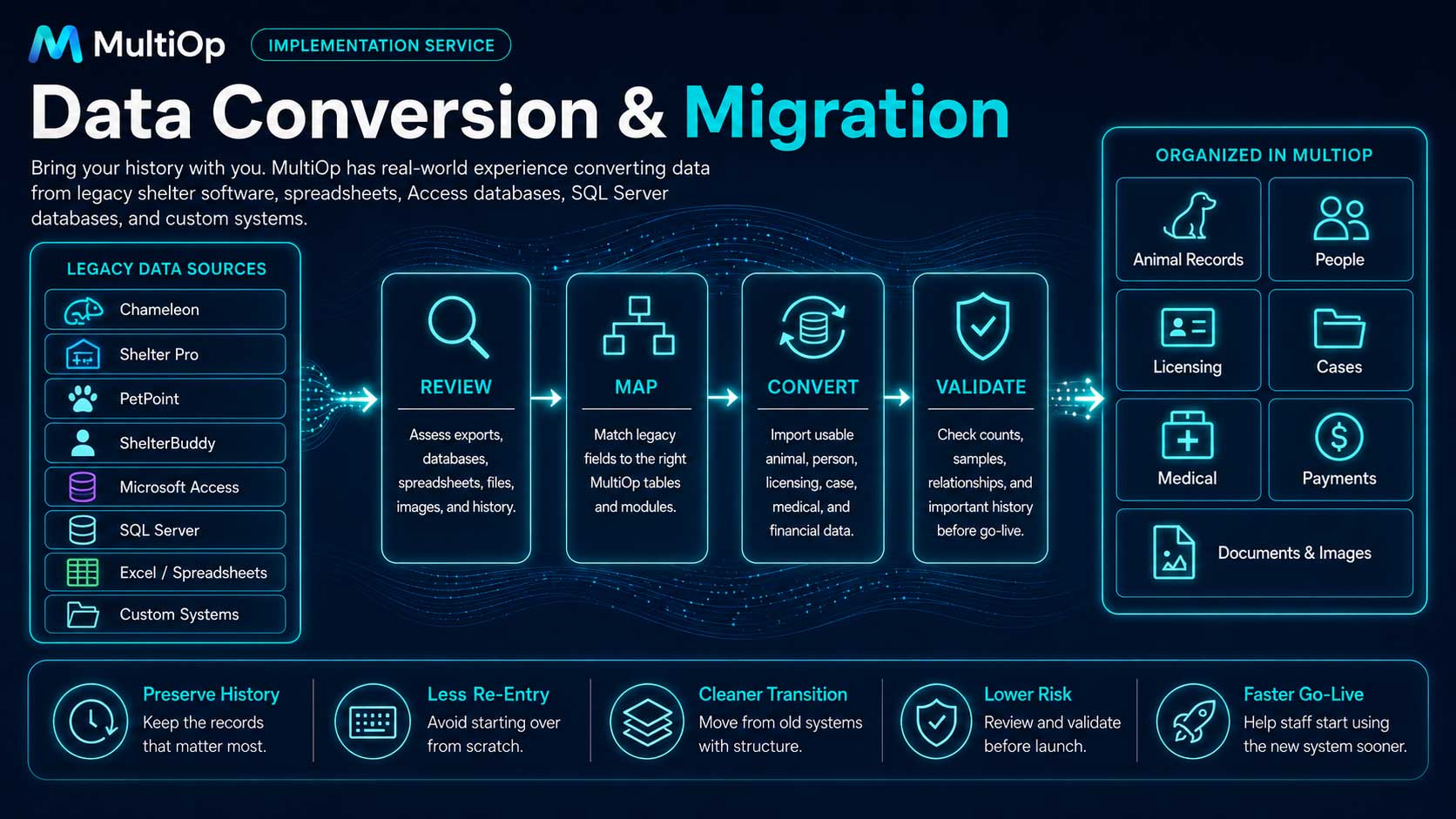
Multiple Options has real-world experience converting data from a range of previous systems, including Chameleon, Shelter Pro, PetPoint, ShelterBuddy, Microsoft Access databases, SQL Server databases, Excel spreadsheets, and other custom legacy formats. Every conversion is different, but the goal is always the same: arrive at go-live with clean, connected, verified data in MultiOp.
Data conversion is not a bulk copy. It is a careful, structured process that results in data your staff can trust from day one.
Actual conversion scope depends on the source system, available data, export quality, and the agency's implementation goals. Multiple Options evaluates each conversion individually and will provide a clear assessment of what is feasible before work begins.
The Migration Process
- Review — Assess the source system’s data structure, formats, and record types
- Identify — Determine which records and fields need to move into MultiOp
- Map — Define how each legacy field corresponds to MultiOp’s data structures
- Convert — Transform and import records in a structured, controlled process
- Validate — Run verification checks for completeness and accuracy
- Review with Staff — Walk through the converted data together before go-live
Common Questions
Questions we hear from agencies planning a new implementation or transitioning from a previous system.
What systems can you convert data from?
Multiple Options has experience converting data from Chameleon, Shelter Pro, PetPoint, ShelterBuddy, Microsoft Access databases, SQL Server databases, Excel spreadsheets, and other custom legacy formats. Every conversion is assessed individually. Actual scope depends on the source system, available data, export quality, and your implementation goals.
How long does a typical MultiOp implementation take?
Implementation timelines vary based on the modules being deployed, the amount of customization needed, and whether a data conversion is included. Multiple Options works with each agency to establish a realistic timeline as part of the implementation planning process.
Can we request changes after the initial implementation?
Yes. MultiOp is designed for ongoing configuration and adaptation. As your agency's needs evolve — new ordinances, changed workflows, expanded operations — configuration adjustments and custom report changes can be requested through the normal support and development process.
Is there a standard baseline configuration, or does everything have to be built from scratch?
MultiOp ships with a solid working baseline for shelter, animal control, and licensing operations. Implementation focuses on adapting that baseline to your agency — adjusting terminology, forms, reports, and workflows — rather than building from zero.
Let's Talk About Your Implementation
Whether you are planning a new implementation, transitioning from a legacy system, or looking to expand what MOASMS does for your organization, Multiple Options can walk you through the options.